Focus Has a Blind Spot
I miss meetings. Or, I did miss meetings. Enough times that I finally got annoyed enough to do something about it.
Working from home, deep in a technical problem, I’d have the kind of focus where the rest of the world just stops existing for a while. And somewhere in that window, a notification would appear in the corner of my screen, linger for a few seconds, and disappear. By the time I surfaced, I had a Slack message from my manager asking if I was going to join the call.
It happened more than a few times.
The built-in notification is fine for most things. For calendar events it’s just not enough - not if you’re the kind of person who actually gets into a flow state and stops processing ambient information. I needed something that couldn’t be ignored.
Looking for an existing solution
I did what I always do first: I looked for something that already existed. I found one app that did basically what I wanted. It had good reviews. It also wanted a monthly subscription.
That was a non-starter. Not because of the price specifically (a few dollars a month), but because the thing runs entirely on my machine, against my calendar data, with no backend, no sync, no ongoing infrastructure. There’s nothing subscription-worthy happening here. Paying recurring fees for local software is a dealbreaker for me, so I closed the tab and opened Xcode instead.
Hey Listen
The result is Hey Listen, a macOS menu bar app that shows a full-screen alert before calendar events.
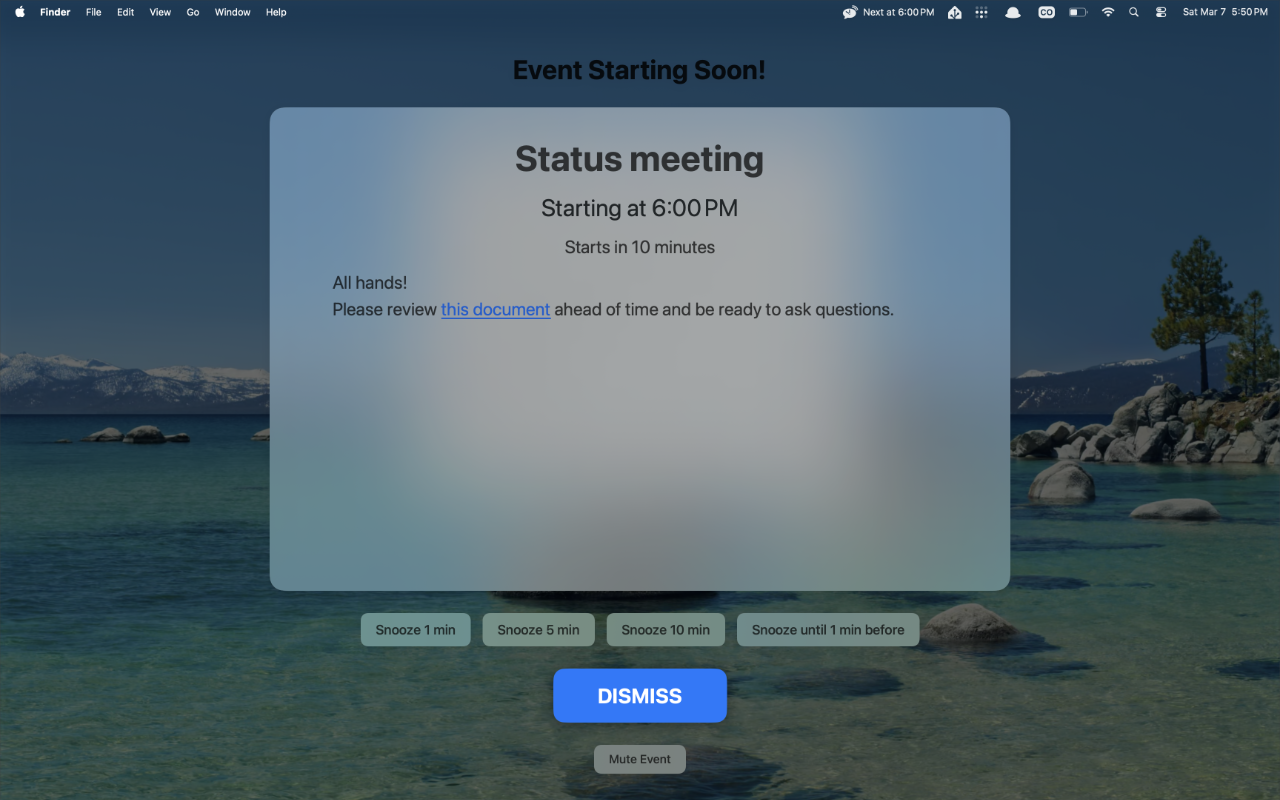
Not a notification badge. Not a banner that slides in and out. The whole screen. Every screen, if you have more than one like I do. Event title, start time, description if there is one, and action buttons. It’s impossible to miss, which was the entire point.
Beyond the core overlay, I built in a few things that turned out to matter in practice:
Snooze options. 1, 5, or 10 minutes, or snooze until a specific number of minutes before the event starts. Useful for when you get the alert and genuinely need two more minutes to finish a thought.
Join Meeting button. It detects Zoom, Google Meet, and Teams links in the event and surfaces a one-click join button right in the overlay. No hunting through the calendar app mid-alert.
Configurable alert timing. You can set a global default, then override it per-calendar, per recurring event series, or per individual event. The most specific setting wins. I have a few recurring events I want 10-minute warnings on and most things at just 1. This notifies me when I need to be notified for each event.
Mute controls. You can mute a specific event, a recurring series, or any event whose title matches a pattern. I have a “Focus Time” block on my calendar that I never want an alert for. One pattern rule, done.
Work hours. Alert only during the hours and days you define. No Saturday morning alerts for something you scheduled two weeks ago.
Multi-monitor support. Show alerts on the active screen only, or all connected displays. I use two monitors in addition to the macbook’s screen and wanted the alert wherever my attention actually was.
No accounts. No analytics. No network calls. Everything stays on your Mac. It reads from whatever calendars you already have in macOS Calendar - iCloud, Google, Outlook, Exchange, anything CalDAV.
It’s on the Mac App Store now. If you miss meetings, it’ll fix that.